---
title: Cracklessegg transport mode
description: Discover how Transport Mode enhances the CracklessEgg sensor, allowing continuous monitoring of impacts, temperature, and humidity during transport for improved visibility and data collection.
image: https://get.masitek.com/hubfs/cracklessegg-transport-mode-facebook-post.png
---
[](https://cracklessegg.com)
[Buy Now](https://cracklessegg.com/products/cracklessegg) [Request a Demo](https://28el0.share.hsforms.com/2tc8S5oQfQWyzHAJPBG8KHg)
New Feature
# Transport Mode
**Know what happens in transit**
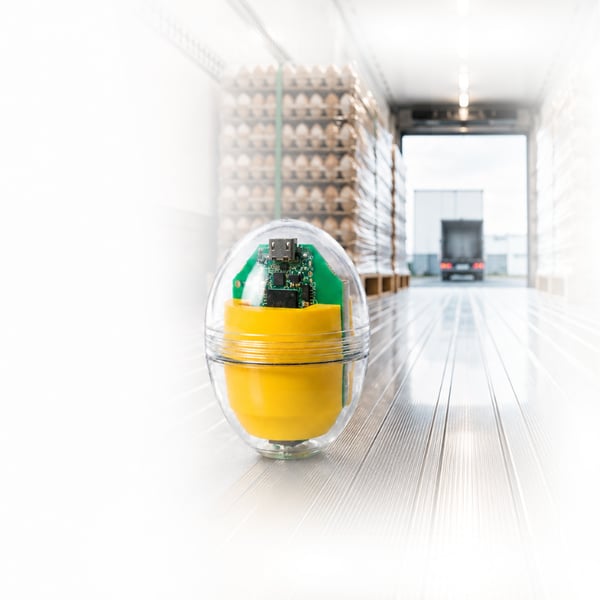
The CracklessEgg sensor travels with your eggs to measure real-world impacts, temperature, and humidity throughout handling and transport. With Transport Mode, measurement continues even when the CracklessEgg sensor is disconnected from the mobile app.
Reconnect at any destination, retrieve the data, and continue the same measurement run if the journey continues.
[Request a Demo](https://28el0.share.hsforms.com/2tc8S5oQfQWyzHAJPBG8KHg) [See How It Works](https://get.masitek.com/en-ca/cracklessegg-transport-mode#transport-mode)
## Simple, Flexible, Continuous.

#### Start a Measurement Run
Connect and calibrate the CracklessEgg sensor using the mobile app. Start a measurement run and initiate a Transport Handoff.

#### Place the CracklessEgg Sensor
Place the CracklessEgg sensor with the eggs being monitored.

#### Measurement Continues
With Transport Mode, the CracklessEgg sensor continues measuring impacts, temperature, and humidity, even without a phone connection.

#### Reconnect at the Destination
An authorized user can reconnect to the CracklessEgg sensor using the mobile app and continue the same measurement run if the journey continues.

#### Upload and Review Results
Once complete, upload the measurement run to the Customer Portal to review the results.
- %20(900%20x%20900%20px)-2.png?width=788&height=788&name=Transport%20mode%20(700%20x%20900%20px)%20(900%20x%20900%20px)-2.png)
**Start a**
**Measurement Run**
- %20(900%20x%20900%20px).png?width=788&height=788&name=Transport%20mode%20(700%20x%20900%20px)%20(900%20x%20900%20px).png)
**Place the**
**CracklessEgg Sensor**
- %20(900%20x%20900%20px)-3.png?width=788&height=788&name=Transport%20mode%20(700%20x%20900%20px)%20(900%20x%20900%20px)-3.png)
**Measurement Continues**
- %20(900%20x%20900%20px)-5.png?width=788&height=788&name=Transport%20mode%20(700%20x%20900%20px)%20(900%20x%20900%20px)-5.png)
**Reconnect at**
**the Destination**
- %20(900%20x%20900%20px)-6.png?width=788&height=788&name=Transport%20mode%20(700%20x%20900%20px)%20(900%20x%20900%20px)-6.png)
**Upload and**
**Review Results**

# How Transport Mode Works
Follow your egg journey from start to finish.

**Update the CracklessEgg Mobile App**
Visit the Apple App Store or Google Play and make sure you have the latest version of the CracklessEgg app installed.

**Update the CracklessEgg Sensor Firmware**
Turn on and connect the **CracklessEgg sensor.** Tap the **gear icon → Firmware,** select the latest compatible firmware version, and tap **Start Updating.**

**Start a Measurement Run**
Tap the **Record icon**, enter a name and description, then tap **Start a Measurement Run**. **Keep the CracklessEgg sensor still while it calibrates.**

**Start Transport Handoff.**
When you're ready to begin the journey, place the **CracklessEgg sensor** with the eggs being monitored. Tap the **Stop icon** and select **Transport Handoff**.

**Transport and Record**
A **“Transport Handoff Started”** message confirms that Transport Mode is active. The **CracklessEgg sensor** enters Low Power Mode, disconnects from the mobile app, and continues measuring **impacts, temperature, and humidity** throughout the journey. **No continuous phone connection is required.**

**Reconnect and Retrieve Data**
At a stop or destination, wait for the **blue LED to flash**, indicating the sensor is available to reconnect. While in Transport Mode, the sensor becomes available approximately every **2 minutes**, providing a **30-second connection window**.
Select the **CracklessEgg sensor** in the mobile app and connect via Bluetooth. Confirm the active **measurement run**, verify the details, and tap **Start a Run** to retrieve the data recorded so far. Select **Cancel** to exit without retrieving the data—the sensor will remain in **Transport Mode** and continue recording.

**Review, Document and Choose What’s Next**
Once the data is retrieved, review the measurements collected so far and add **notes, photos, or videos** to document the stop. When ready, tap the **Stop icon** and select **Continue Run** to keep measuring in Live Mode, **Save Run** to complete the measurement run, or **Transport Handoff** to begin another leg of the journey.

**Upload Your Measurement Run**
Once the **measurement run** is complete, go to **Past Runs** and find it by name. Swipe right and tap the **Upload cloud icon** to sync it to the **Customer Portal**. A progress bar will show the upload status until it reaches **100%**. Once complete, your measurement run is ready to review in the Customer Portal.

**See the Complete Journey**
Once uploaded, your complete **measurement run** is available in the **Customer Portal**, bringing together **impacts, temperature, humidity, notes, photos, and videos** in one place.
Follow the journey on the interactive chart, with **Live Mode shown in green and Transport Mode in gray**, along with key handoff and reconnection events.



## Estimate the Cost of Hidden Transport Damage
Even small levels of transport-related breakage can add up quickly. Use our calculator to estimate the potential annual value at risk based on your operation's transport volume and damage rates.
[Launch Calculator](https://cracklessegg.outgrow.us/CracklessEgg-Transport-Calculator)
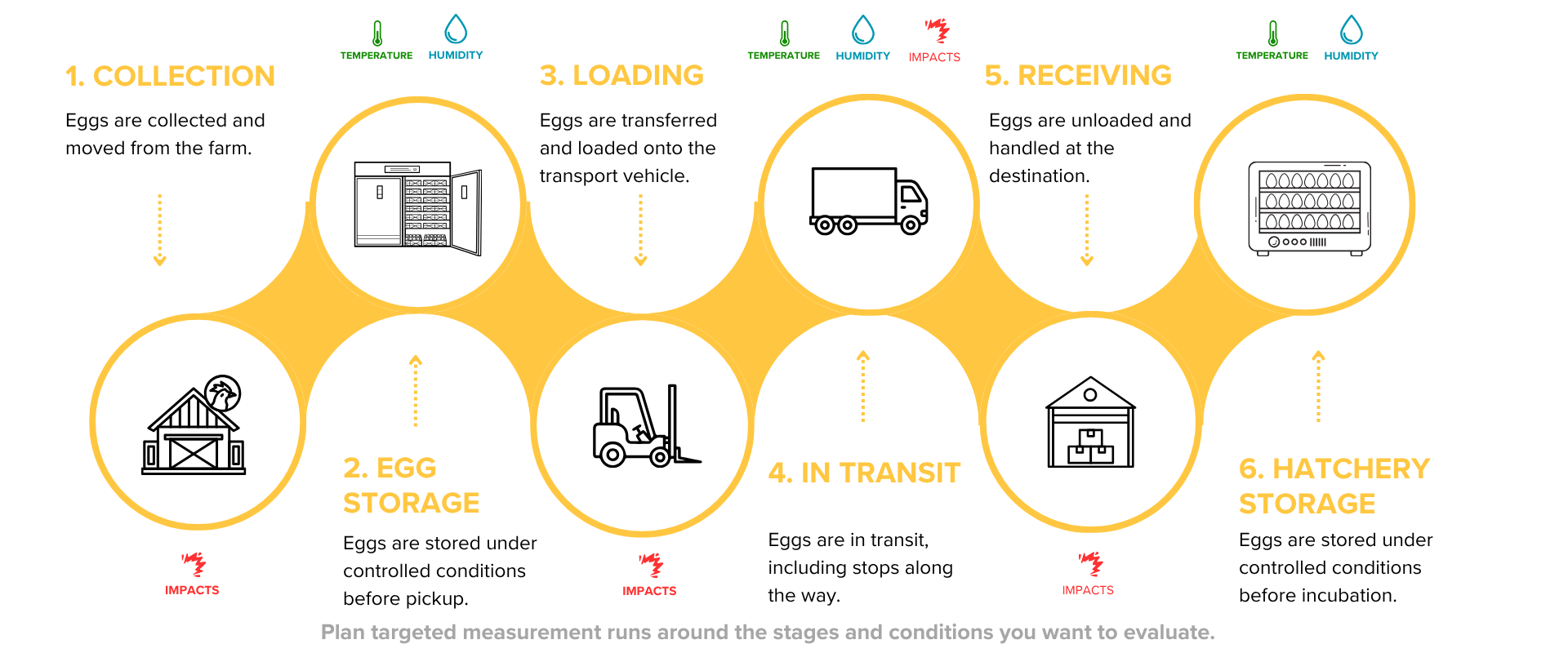
## Monitor Critical Points Across the Egg Journey
Use the CracklessEgg sensor at key stages to measure real-world impacts, temperature, and humidity where they matter most.
## Need More Details?
### What is Transport Mode?
Transport Mode allows the CracklessEgg sensor to continue collecting data while disconnected from the mobile app. This enables the sensor to travel with the eggs and record impacts throughout the journey without requiring an active phone connection.
### What problems does Transport Mode solve?
Transport Mode solves the lack of visibility during egg transport. It allows the sensor to continue collecting impact data without a continuous phone connection, helping identify where damaging events occur between departure and arrival.
### Can another user reconnect to the sensor at the destination?
Yes. Once the shipment arrives, another authorized user can reconnect to the same sensor, retrieve the recorded data, upload it to the portal, and continue the run if needed.
### Can a transport run be handed off multiple times?
Yes. A single run can be handed off between multiple users and locations. For example, User 1 can start the run, User 2 can reconnect at the next destination, and User 3 can continue it further along the transport chain. There is no limit to the number of sequential handoffs within the same run.
### When should I use Transport Mode?
Transport Mode is ideal when eggs are being transported between facilities, hatcheries, farms, or distribution centers and the sensor needs to travel with the shipment while continuing to collect data.
### Does the sensor need to stay connected to a phone during transport?
No. Once **Transport Handoff** is started, the sensor enters **Low Power Mode**, disconnects from the app, and continues recording data throughout the journey.
### Can I add notes, photos, and videos during the journey?
Yes. When you reconnect to the sensor and retrieve the run data, you can add **notes, photos, and videos** to document conditions or observations at each stop.
### Where can I review my Transport Mode data?
After completing the run, upload it from the app to the **Customer Portal**. There you can review impacts, temperature, humidity, notes, photos, videos, and the complete measurement timeline. **Transport Mode portions are shown in gray**, while connected Live Mode portions appear in green.
### Do I need to update the app and sensor firmware to use Transport Mode?
Yes. Existing customers should make sure they have the **latest version of the CracklessEgg app** and update their sensor to the **latest compatible firmware** before using Transport Mode. The firmware can be updated from the sensor settings in the app while connected to the sensor.
#### Continuous Monitoring
Measure impacts, temperature, and humidity without maintaining a constant phone connection.
#### Flexible Handoffs
Reconnect with another authorized user and continue the same measurement run.
#### End-to-End Visibility
Monitor conditions throughout the journey, from storage and loading to transport and final destination.
#### Better Decisions
Review measurement data and identify opportunities to reduce risk and improve handling.
[](https://cracklessegg.com)
### Shop
- [CracklessEgg System](https://cracklessegg.com/products/cracklessegg)
- [Accessories](https://cracklessegg.com/collections/accessories)
- [Training](https://cracklessegg.com/products/cracklessegg-training)
### About
- [About Us](https://cracklessegg.com/pages/about)
- [Reviews](https://cracklessegg.com/pages/reviews)
- [Sensors for Hatcheries](https://cracklessegg.com/pages/poultry-breeders-and-hatcheries)
- [Sensors for Egg Producers](https://cracklessegg.com/pages/egg-producers)
- [Case Study](https://cracklessegg.com/pages/case-study)
- [Blog](https://cracklessegg.com/blogs/blog)
### Help
- [Contact](https://cracklessegg.com/pages/contact)
- [Support](https://cracklessegg.com/pages/support)
- [Warranty](https://cracklessegg.com/pages/warranty)
- [Shipping](https://cracklessegg.com/policies/shipping-policy)
**CracklessEgg is a division of aaggrrii.**
© Copyright 2026 Masitek Instruments Inc.
All rights reserved.
```json
{
"@context" : "https://schema.org",
"@type" : "VideoObject",
"contentUrl" : "https://3751380.fs1.hubspotusercontent-na1.net/hubfs/3751380/video_assets/217838596355/inherited/web_optimized.mp4",
"dateModified" : "2026-07-23T19:24:36.562Z",
"duration" : "PT28.38S",
"height" : 864,
"name" : "Transport Mode Overview-2",
"thumbnailUrl" : "https://3751380.fs1.hubspotusercontent-na1.net/hubfs/3751380/Transport%20Mode%20Overview-2.mp4/medium.jpg",
"uploadDate" : "2026-07-23T19:24:32.308Z",
"width" : 2016
}
```